
AI Event Assistant
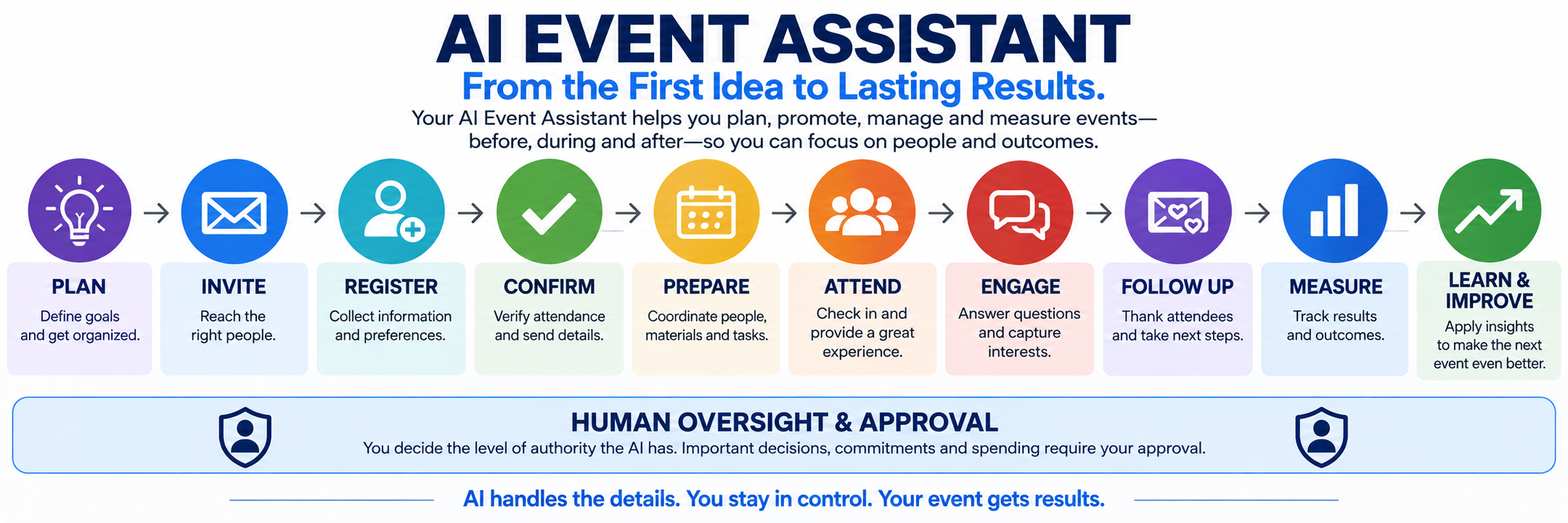
From the first idea and invitation to the final follow-up, help keep the people, communication, information and next steps surrounding your event moving.
Use it simply for registration and reminders, or explore a more coordinated event-management experience built around your business, your attendees and the way you want the event to run.
AI Event Assistant
Don't Just Plan the Event
Help Manage the Entire Attendee Journey.
Customer events, product demonstrations, open houses, workshops, lunches, seminars, conferences, employee gatherings, private meetings and other approved events can all use the same underlying tools in different ways.
An Event Is More Than a Date on the Calendar.
Use as Much Event Assistance as Your Business Needs.
Before the Event
Invite the Right People and Know Who Is Responding.
Reach the right people with a coordinated invitation and response process using the appropriate channels for the event and the customer's communication permissions.
Invite
Reach the appropriate customer, prospect, employee, partner or other audience with event information and a clear way to respond.
Track Interest
Know who registered, who has not responded and, where properly configured, who engaged with digital invitations or links but has not yet completed registration.
Follow Up Appropriately
Different responses can lead to different next steps instead of sending everyone the same reminder over and over.
Sending Printed Invitations?
Ask your print or mailing provider about personalized URLs, QR codes or variable-data options that may help connect offline invitations with your digital event campaign. Availability and setup depend on the print provider and the event design.
Event Assistance Options
Start Simple, or Take It Further.
Use as much event assistance as your business needs, from attendee assistance to a more coordinated event-management experience.

Registration Is Not the Final Head Count
Help Make Sure the People Who Said Yes Are Still Coming.
For events involving food, reserved seating, hotel space, staffing, materials or limited capacity, a registration from three weeks ago may not be enough.
Registered
The attendee chooses the event, session or appropriate registration option.
Confirmed
Confirm the registration and deliver the information they need.
Reconfirmed
Check closer to the event when an accurate attendance count matters.
Adjusted
If plans change, explore another appropriate session when capacity, scheduling and configured business rules allow.
Confirmation Message
We still have you scheduled for Wednesday morning. Are you still planning to join us?
A simple confirmation can help protect the event plan before food, seating, materials or staff are committed around an outdated head count.
Multiple Sessions and Business Rules
One Event Can Have More Than One Group.
A two- or three-day event might have morning, afternoon or evening groups, limited capacity and different attendee needs.
Where the platform and implementation support it, event information can help organize attendees by session, ticket or other configured criteria. More specialized rules, such as keeping certain competitors, territories or customer groups apart, may require custom logic and should be evaluated individually.
Interesting Idea? Bring It to Us.
Food, Vendors and Surrounding Details
Help Coordinate the Work Around the Event.
Food, staffing, vendors, materials and venue details can create a second layer of work around the attendee experience. The AI Event Assistant can help organize the information and tasks surrounding those responsibilities.
Coordinate Extensively. Authorize Carefully.
During the Event
Make the Event Easier to Navigate and Easier to Measure.
Check In
Support event check-in and use attendance information to drive the appropriate next steps.
Answer Questions
Help attendees find schedules, locations, session information, instructions or other approved event information.
Capture Interest
Forms, surveys, QR codes, tablets or other configured experiences can help attendees request information, express interest or provide feedback.
Fresh Feedback
Sometimes the best feedback happens while the experience is still fresh.
A self-service kiosk, QR code or a friendly employee with a tablet can give attendees an easy opportunity to answer a few questions without turning the interaction into a long or uncomfortable interview.
After the Event
The Event Ended. The Opportunity to Learn From It Didn't.
Thank & Follow Up
Send appropriate thank-you messages, resources, recordings, next steps or 'sorry we missed you' communication based on what happened.
Feedback & Reviews
Ask what attendees thought, identify problems and, when appropriate, connect legitimate customers to a responsible review-request process.
Appointments & Opportunities
Someone who expressed interest can be routed toward additional information, a salesperson, an appointment or the appropriate nurturing process.
Different attendees should not necessarily receive the same follow-up. Someone who requested a demonstration may need a very different next step from someone who simply attended and enjoyed the event.
Management Intelligence
What Did We Learn From the Event?
A successful event should produce more than a guest list. Depending on what the business chooses to track, event data can help management understand participation, engagement, opportunities and what should improve next time.
Participation
Invited, engaged, registered, reconfirmed, attended and no-show information.
Interest
Products, services, sessions, questions, requested information and appointment interest.
Experience
Feedback, recurring questions, complaints, compliments and operational issues.
Business Results
Where configured and reasonably trackable, costs, opportunities, appointments, sales and other event outcomes.
Worth Asking
Was the event worth doing? What worked? What didn't? What should we change before the next one?
Responsibility Without Unchecked Authority
Don't Confuse Capability With Authority.
Your AI Event Assistant may be capable of helping with a great deal. That doesn't mean it should be authorized to make every decision on its own.
Organize
Information, schedules, tasks, attendee data and routine event details.
Assist
Prepare communications, summaries, recommendations and next steps.
Coordinate
Help keep approved processes moving across attendees, staff and event responsibilities.
Escalate & Approve
Bring consequential spending, commitments, conflicts, exceptions or sensitive decisions to an authorized human.
The more responsibility you give the AI, the more important appropriate oversight, approvals, testing and review become.
Beyond Today's Feature List
Have an Event Idea You Don't See Here?
Technology changes quickly. Some ideas may already be possible through current platform capabilities. Others may require custom workflows, outside services, integrations or human-assisted processes.
Don't limit your event ideas to the features listed on this page. Tell us what you would like to accomplish. We'll explore what's practical, determine what technology is required, test promising approaches and explain where human involvement or outside services are still needed.
Examples such as advanced attendee-grouping rules, personalized print-to-digital tracking, extensive vendor coordination or AI-assisted event planning should be evaluated for the specific event rather than assumed to be standard built-in features.
Choose the AI Assistant Team Plan That Fits Your Use
The AI Event Assistant Is a Role Within Your Broader AI Assistant Team.
You can start with a focused event workflow and expand the assistance as your needs justify it.
$149 / month
$299 / month
$499 / month
Implementation and Usage
Behind every good AI solution is a human.
Event staff and leadership make key decisions regarding venue, speakers, budget, and hospitality. AI manages communication workflows and logistics, keeping you in complete control.
The GSW Implementation Progression
1. Organize & Train
Approved knowledge and boundaries
2. Assist & Coach
Side-by-side staff support
3. Copilot
Drafts with human approval
4. Carefully Automate
Routine work with escalations
AI Assistant Team Pricing
You are not buying each assistant separately.
The AI Assistant Team is a flexible architecture. Choose a team plan based on your usage level, then configure the assistants that fit your business.
A simple starting point for lighter activity. Access to the AI Assistant Team with applicable AI usage paid as you go.
- Full access to AI Assistant Team roles
- Pay-as-you-go AI usage
- Ideal for lighter expected activity
For businesses expecting more regular AI activity. Includes defined monthly AI usage allowances, with applicable additional usage thereafter.
- Full access to AI Assistant Team roles
- Defined monthly AI usage allowances
- Predictable monthly baseline
For businesses expecting substantially heavier AI usage. Provides the largest included usage structure and broader applicable fair-use allowances.
- Full access to AI Assistant Team roles
- Largest included usage structure
- Designed for higher-volume organizations
Not Sure Where to Start?
A small business with lighter expected usage may begin with Flex. Businesses expecting more regular activity may prefer Plus. Higher-volume organizations may find Premier more appropriate. If your usage changes, we can help you evaluate whether another plan makes better economic sense.
Telephone service, calling, messaging, AI usage, and other variable or enhanced capabilities may involve additional charges depending on the selected solution and usage.
Related Assistants
Often used together.
Combine when it makes sense. Specialize when it helps. You do not need to choose everything on day one.
AI Appointment Assistant
Getting the Appointment Is Only Half the Job. Now Help Make Sure It Actually Happens.
Explore Appointment AssistantAI Outreach Assistant
Give More Opportunities a Chance to Be Pursued.
Explore OutreachAI Administrative Team
What If More of the Everyday Office Work Could Keep Moving Without Waiting on You?
Explore Administrative TeamWhat Would You Like Your Event Assistant to Help Accomplish?
Maybe you simply need registrations and reminders. Maybe you're coordinating several sessions across several days. Maybe you're planning a customer event with food, staff, follow-up and sales opportunities. Or maybe you have an idea that requires something more specialized. Bring us the event and the problem you're trying to solve. We'll help determine what can be handled with current technology, what needs configuration, what should remain under human control and what may require additional services.
Get Started Websites: We listen before we recommend.