
AI Receptionist
What If You Could Add More Help Without Immediately Adding Another Employee?
Whether you're starting by yourself, supporting an existing receptionist, or managing a growing team, there eventually comes a point when there are more calls, questions, and interruptions than people available to handle them.
Starting alone, already have a receptionist, or growing?
Your AI Receptionist can help add telephone capacity without requiring you to immediately add another employee every time the workload increases.
Always Ready
Answers incoming calls, answers approved questions, qualifies, schedules appointments, documents details, and routes to your team.
A New Kind of Backup
Imagine Giving Your Receptionist a New Kind of Backup.
Think about the responsibilities you might expect to see on the résumé of a good receptionist: answer the phone, greet callers, understand what they need, answer questions, collect information, route calls, take messages, schedule appointments, document what happened, and know when someone else needs to become involved.
Your AI Receptionist can help with many of those same responsibilities.
But Then the Résumé Starts Getting Interesting.
Multiple Languages
A human receptionist may speak English and perhaps Spanish or another language. Your AI Receptionist can be configured to communicate in multiple supported languages, giving your business another way to serve callers who may not speak the same language as the person currently answering the telephone.
Multiple Calls at Once
A human receptionist can normally conduct one telephone conversation at a time. Your AI Receptionist can help with multiple telephone conversations at the same time, keeping callers from hitting busy signals or voicemail during unexpected call surges.
Evenings, Weekends & Holidays
A human receptionist eventually needs to go home. Your AI Receptionist can continue answering evenings, weekends, and holidays, even 24/7 if that is what you want, capturing opportunities while your office is closed.
Schedule During the Call
And when an appropriate caller wants an appointment, your AI Receptionist can check available times and help schedule it while they are already on the phone. There is no need to transfer the caller to another AI just to perform a task the Receptionist can handle during the same conversation.
Configured Outbound Calling
Your AI Receptionist can also be configured for appropriate outbound calling where enabled. Depending on your business and implementation, that may include approved follow-up, confirmations, or other configured communications. Outbound calling is designed around clear business rules, permissions, and human oversight.
But AI Is Still AI
It isn't human. It can't physically stand behind your front desk, shake someone's hand, notice everything a person might notice, exercise human judgment in every situation, or assume authority your business hasn't given it. We don't look at AI as a replacement for everything people do. We look at it as another powerful layer of help.
"Wait... Will It Sound Like a Robot?"
Maybe you've dealt with robotic voices, long pauses, awkward responses, and the dreaded "I'm sorry. I didn't understand that."
We Don't Want That Answering Your Customers Either.
Voice AI has advanced dramatically. Today's advanced Voice AI can provide increasingly natural, conversational interactions that are very different from older automated telephone experiences. What if your AI Receptionist sounded remarkably natural? Natural enough that some callers might not immediately recognize whether they were speaking with a person or AI?
What If Your Customers Could Simply Talk?
AI Receptionist:
"Thank you for calling ABC Company. How can I help you?"
Caller:
"I'm not really sure who I need to talk to. We're opening another location and wanted to see if you could help us with..."
AI Receptionist:
"Absolutely. Let me ask you a couple of questions so I can help point you in the right direction."
A useful business receptionist your customers can actually talk to. Every business is different. That's why we configure it, test it, listen to it, and improve it before giving it greater responsibility.
Human-Centered Technology
Let Your Receptionist Focus on the Person Standing in Front of Them.
Your receptionist isn't trying to provide poor service when the phone interrupts an in-person conversation. They're simply being asked to serve several people at the same time.
Your visitor can receive more uninterrupted attention while appropriate incoming callers can still receive assistance.
Let your AI Receptionist catch the calls so your receptionist can give their attention to the people standing right there in front of them.

Approved GSW Visual: Receptionist focused on the visitor while AI handles the incoming telephone calls simultaneously.
Your Phone Shouldn't Own Your Day.
You're meeting with a customer, making a sales presentation, working on something important, or simply trying to get through your day. Then the phone rings. You feel compelled to answer because you don't know who's calling. It could be your next sale.
So you interrupt the person in front of you or stop what you're doing. Then you discover it was a telemarketer, a routine question, a vendor, or something that could easily have waited.
But ignoring the phone isn't necessarily the answer either, because next time it really could be an important customer or your next sales opportunity.
What If Someone Could Answer First and Find Out?
Let your AI Receptionist answer appropriate incoming calls, find out why someone is calling, help when it can, collect what you need, and involve you when your attention is actually needed. If that caller is a potential customer who's ready to take the next step, your AI Receptionist can even help schedule an appointment when appropriate.
You don't have to answer every ringing phone out of fear that the one you ignore might have been your next sale. Your AI Receptionist has your back.
Own Your Time. Protect Your Focus.
Capacity & Concurrency
What Happens When Everybody Calls at Once?
A traditional receptionist can conduct one telephone conversation at a time while other callers wait, reach voicemail, or hang up. Your AI Receptionist can help with multiple conversations simultaneously.
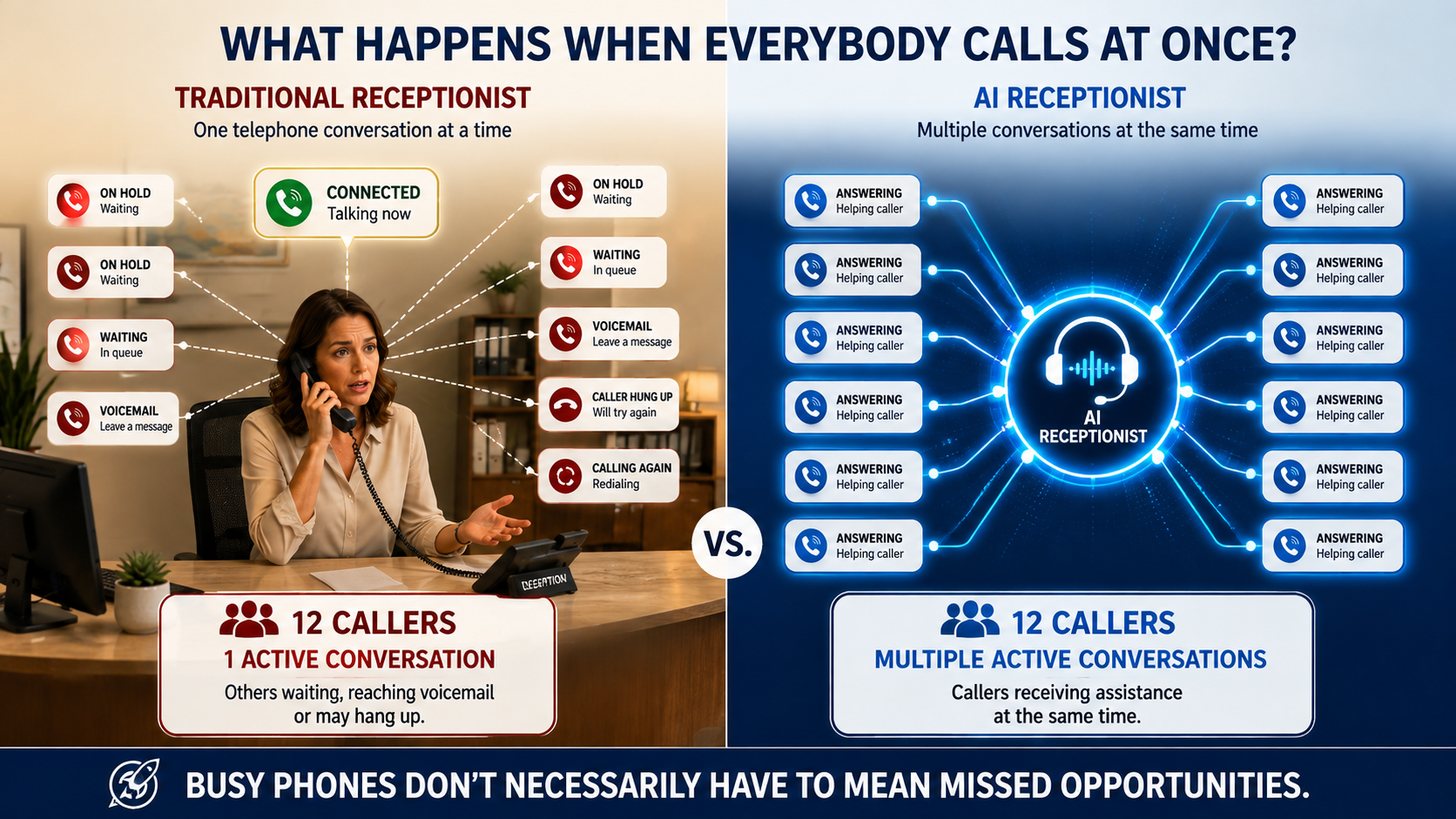
Approved GSW Visual: Busy phones don't necessarily have to mean missed opportunities. (Note: 12 callers is an illustrative example of simultaneous capacity, not a guaranteed maximum or SLA ceiling.)
What If Your Phone System Could Actually Have a Conversation?
Compare the traditional phone menu with conversational voice AI.
Press 1 for Sales.
Press 2 for Customer Service.
Press 3 for Billing.
Press 4 for Technical Support.
- •Listen to a rigid automated menu
- •Try to guess which department fits best
- •Possibly choose incorrectly and wait on hold
- •Transfer and explain everything again
AI Receptionist:
"Thank you for calling. How can I help you?"
- ✓Explain what you need in plain, everyday language
- ✓AI helps determine where to go based on your answer
- ✓Answer clarifying questions smoothly
- ✓Route according to configured knowledge and business rules
Your Customer Knows Their Problem.
They Shouldn't Have to Know Your Organization Chart.
More Than Voicemail
Have you ever listened to a voicemail and discovered the caller didn't leave everything you needed?
Maybe you couldn't understand their name. Maybe the connection was poor. Maybe you replayed the phone number three or four times trying to make sure you wrote it down correctly. Maybe they forgot to leave their phone number altogether.
Or maybe they left a message, but now someone on your staff still has to listen to it, write everything down, enter it into the CRM, and call them back just to collect the information that was missing.
What If You Could Ask the Caller While They're Still on the Phone?
"I didn't catch that. Could you repeat your last name a little more slowly?"
"I have your number as 330-555-1283. Is that correct?"
"What's the best email address for you?"
"And can you tell me a little more about why you're calling?"
Your AI Receptionist can help collect the name, telephone number, email address, company, reason for calling, and other information your business needs during the original conversation.
Humans Can't Always Catch Every Call.
Your AI Receptionist can help catch overflow calls when your human receptionist is already on the phone, helping someone at the front desk, taking a break, at lunch, sick, on vacation, or simply unavailable.
And it doesn't have to stop when the office closes. Your AI Receptionist can continue answering after hours, evenings, weekends, and holidays, even 24/7 if that's what you want it to do.
Your People Can Take a Break. Your Business Can Keep Answering.
One Front Door. Many Places to Go.
Your caller shouldn't have to know which department, employee, or internal process handles their problem before they call you.
They can simply explain what they're trying to accomplish. Your AI Receptionist can ask questions, provide appropriate information, collect what your business needs, route the caller when necessary, send an appropriate resource, start a configured process, or involve a human when that's the right next step.
Help People Find the Answer, Not the Department.
What It Can Do
More Than Someone Who Answers the Phone
Once the conversation begins, your AI Receptionist can do much more than simply say hello.
Understand and Answer
Find out why someone is calling and answer appropriate routine questions using approved information about your business.
Ask and Collect
Ask for the name, contact information, service need, timeline, urgency, referral source, and other details your business wants to collect.
Qualify, Schedule and Route
Help determine basic fit or urgency, check available appointment times, and schedule when appropriate, then route the caller, send information, or start another appropriate process.
Escalate When a Human Is Needed
Important, unusual, sensitive, urgent, or out-of-scope conversations can be handed to a person according to your defined business rules.
Document and Remember
Help preserve useful information from the conversation in call records and CRM-related processes instead of depending entirely on someone's memory and manual notes.
Take the Next Step
Depending on how your system is set up, a call can lead to notifications, messages, workflows, scheduling, follow-up, and other appropriate actions.
Real Situations
What Happens When...?
Choose a caller to see how your AI Receptionist responds.
A New Customer Calls
Caller:
"Hi. I found you online. I'm not sure if you do what I need."
AI Receptionist:
"I'd be happy to help. Can you tell me a little about what you're looking for?"
Configured Progression:
The AI Receptionist greets the caller conversationally, finds out what they need, captures referral source and contact details, and sets up appropriate follow-up.
What Did That Customer Tell You Six Months Ago?
A valuable conversation can become almost useless if the important details disappear into someone's memory or a one-line note.
John Smith
Missing details: budget, timeline, referral source, current provider, specific concerns, and best time to call.
John Smith
New prospect interested in commercial service. Unhappy with existing provider. Looking to make a change within 30 days. Asked about evening availability. Referred by ABC Company. Requested estimate. Best callback after 3 PM.
Next action: Sales follow-up requested.
Full context preserved in CRM records without requiring anyone to transcribe notes manually.
Conversations Can Become Business Memory.
Your people shouldn't have to remember everything. And they shouldn't have to read a ten-minute transcript to discover what matters.
Recording, transcription, AI processing, telephone usage, messaging, storage, integrations, and other enhanced capabilities may involve additional usage or service charges depending on configuration and selected services.
Learn and Improve
Part 1
Learn From the Conversations.
One call is a conversation. Hundreds of calls can begin revealing patterns.
What are customers telling you? Recurring questions, objections, requested services, confusion, escalation patterns, and other themes can help reveal opportunities for improvement.
How did you hear about us? More consistent source capture can help identify inquiries from Google, advertising, social media, referrals, events, your website, and other sources.
Part 2
Use What We Learn to Make It Better.
After your AI Receptionist begins talking with real customers, you may discover things you couldn't have anticipated before launch:
- • Customers keep asking a question we didn't prepare it to answer
- • A particular call type is being transferred to the wrong person
- • Callers repeatedly ask about something missing from your website
- • The AI is involving a human too often, or not soon enough
Your Customers Can Help Show Us What Your AI Needs to Learn Next.
Your AI should not independently invent company policies, pricing, promises, or other authoritative business answers. Your business remains the authority.
Where Would an AI Receptionist Fit in Your Business?
Solo / Small Team
You may be the owner, salesperson, receptionist, customer service department, and administrator all at once. AI can help give a very small or startup business telephone capacity before another front-office hire makes economic sense.
Give Them Strong Backup
Great. Give them backup. AI can help with appropriate overflow, repetitive questions, lunch coverage, vacation, front-desk interruptions, and unexpected call spikes so they can focus on in-person visitors.
Add Capacity Flexibly
Your business may need more telephone capacity without needing another full-time receptionist eight hours every day. AI gives you another way to handle part-time or unpredictable bottlenecks.
Don't Just Ask What AI Could Replace.
Ask What It Could Help Your Existing People Accomplish.
How Much Would It Cost to Provide This Kind of Help With People?
Think about what you've just seen. If you wanted more people available to answer calls when your receptionist is busy, provide coverage during lunch, evenings, weekends, or holidays, collect information, document conversations, handle unexpected call surges, and help prevent opportunities from being missed, how would you accomplish that without AI?
• Hire another employee.
• Add another shift.
• Pay overtime.
• Hire an answering service.
• Pay for overflow coverage.
• Or continue having owners, managers, and salespeople stop what they're doing throughout the day to answer the phone.
And there is another cost that is harder to see: what does an interruption cost when it pulls someone away from a customer, a sales presentation, or productive work? And what does a missed call cost when the person calling was ready to buy?
AI isn't the right replacement for every person or every interaction. But it gives your business another way to add capacity without automatically adding another person every time the workload increases.
It's Also: "How Much More Could Your People Accomplish With the Right Help?"
This Sounds Like a Lot. It Doesn't Have to Be.
After everything you've seen on this page, you may be thinking: "Do I have to set all of this up just to get started?"
No.
Your first AI Receptionist might begin with only a few responsibilities. Maybe it answers the phone, determines why someone is calling, answers a few common questions, collects contact information, and knows when to involve you.
That's enough to start.
Once you're comfortable with how it performs, you can teach it more, add additional responsibilities, connect more business processes, or introduce other AI Assistants.
Start With What Helps You Today. Add More When You're Ready.
Behind Every Good AI Solution Is a Human.
Buying AI technology is one thing. Deciding how AI should represent your business is another.
Define the Boundaries
- • What should it know?
- • What should it say?
- • What should it never say?
- • What actions may it take?
- • What counts as urgent?
- • When should it involve a person?
Your AI Business Knowledge
Services, hours, locations, service areas, FAQs, policies, routing rules, qualification criteria, escalation rules, approved answers, and temporary instructions.
Your Ideas Matter
Now Forget Our Feature List for a Moment.
What Would You Like Your Receptionist to Do?
Maybe somewhere on this page you thought: "I wonder if it could..."
That's exactly the kind of question we want you to ask.
Don't limit your ideas to the features we thought to put on this website. Tell us the business problem or customer experience you'd like to create. We'll explore what's possible.
AI Assistant Team Pricing
Your AI Receptionist Is Only One Member of the Team.
The AI Receptionist is one of more than a dozen AI Assistant roles you can explore through the GSW AI Assistant Team. You aren't buying each assistant separately. Choose an AI Assistant Team plan, then decide which AI roles make sense for your business.
Start with one, add several, or expand over time. The three plans give you access to the same AI Assistant Team. The biggest difference is how AI usage is paid for and how much usage is included.
To Put Your AI Receptionist on the Phone, You'll Need Two Things
An AI Assistant Team Plan
Choose Flex, Plus, or Premier. Each plan gives you access to the AI Assistant Team, while the usage structure changes as you move up.
Integrated Phone Service
Start with 1 integrated phone line for $50/month, or choose 3 integrated phone lines for $99/month. Additional telephone options and larger configurations can be explored in our Phone section.
Learn more about Phone SolutionsA simple place to start when usage is expected to be light. Access to the AI Assistant Team with applicable AI usage paid as you use it.
- Full access to AI Assistant Team roles
- Pay-as-you-go AI usage
- Ideal for lighter expected call volume
For businesses expecting more regular AI activity. Includes defined monthly AI usage allowances, with applicable additional usage thereafter.
- Full access to AI Assistant Team roles
- Defined monthly AI usage allowances
- Predictable monthly baseline
For businesses expecting substantially heavier AI usage. Provides the largest included usage structure and broader applicable fair-use allowances.
- Full access to AI Assistant Team roles
- Largest included usage structure
- Designed for higher-volume organizations
Not Sure Where to Start?
A small business with lighter expected usage may begin with Flex. Businesses expecting more regular activity may prefer Plus. Higher-volume organizations may find Premier more appropriate. If your usage changes, we can help you evaluate whether another plan makes better economic sense.
Telephone service, calling, messaging, AI usage, and other variable or enhanced capabilities may involve additional charges depending on the selected solution and usage.
Where Do You Go Next?
Your AI Receptionist is only the beginning. There are more than a dozen other AI Assistant roles to explore.
AI Appointment Assistant
Help manage what happens around scheduled appointments, including appropriate confirmations, reminders, and appointment-related follow-up.
Explore Appointment AssistantAI Information Desk
Explore how AI can help provide approved business information, answer appropriate questions, and guide people toward the right next step.
Explore Information DeskAI Customer Service Assistant
Explore how AI can help customers with appropriate service questions, information collection, next steps, and human escalation when needed.
Explore Customer ServiceCommon Questions
Frequently Asked Questions
Does an AI Receptionist replace my current receptionist?
Not necessarily. Many businesses use AI to support an existing receptionist with appropriate incoming calls, overflow, after-hours coverage, routine questions, and information collection so your human receptionist can focus on visitors standing right in front of them.
Can I start small?
Yes. Your initial implementation doesn't need every capability shown on this page. Begin with a smaller set of responsibilities, like answering common questions, collecting caller details, and knowing when to escalate, and expand as appropriate.
What happens if it doesn't know an answer?
Its instructions define when it should ask another question, provide approved information, or involve a person rather than pretending to know something it doesn't. Sometimes the best answer is acknowledging uncertainty and routing to a human team member.
Can the AI Receptionist schedule appointments?
Yes. When appropriate, your AI Receptionist can check available appointment times and help schedule an appointment during the same conversation. The separate AI Appointment Assistant can support the broader appointment lifecycle, such as reminders, confirmations, rescheduling, and follow-up.
Can it transfer calls to a person?
Appropriate call-transfer and escalation behavior can be configured depending on your telephone setup and implementation.
Can it work after hours?
Yes, depending on your configured telephone coverage and AI Receptionist setup. It can answer evenings, weekends, and holidays, even 24/7 if that is what you configure.
Will there be additional usage charges?
There can be. Telephone usage, messaging, AI processing, and certain enhanced capabilities, integrations, or services may result in additional charges depending on your plan and configuration.
Still Have a Question?
Tell us what you'd like your AI Receptionist to accomplish. We'll explore what's practical and what it would take to create the right solution for your business.
Get Started Websites: We listen before we recommend.