
AI Sales Assistant
Helping the Salesperson Prepare, Perform, and Stay Focused on What Matters.
Assists the human salesperson throughout the sales process by organizing account details, prioritizing attention, and handling routine prep, so salespeople spend more time with buyers.
AI Sales Assistant
The Idea
Your salespeople have only so much time and attention. Give them another layer of help around the work of selling.
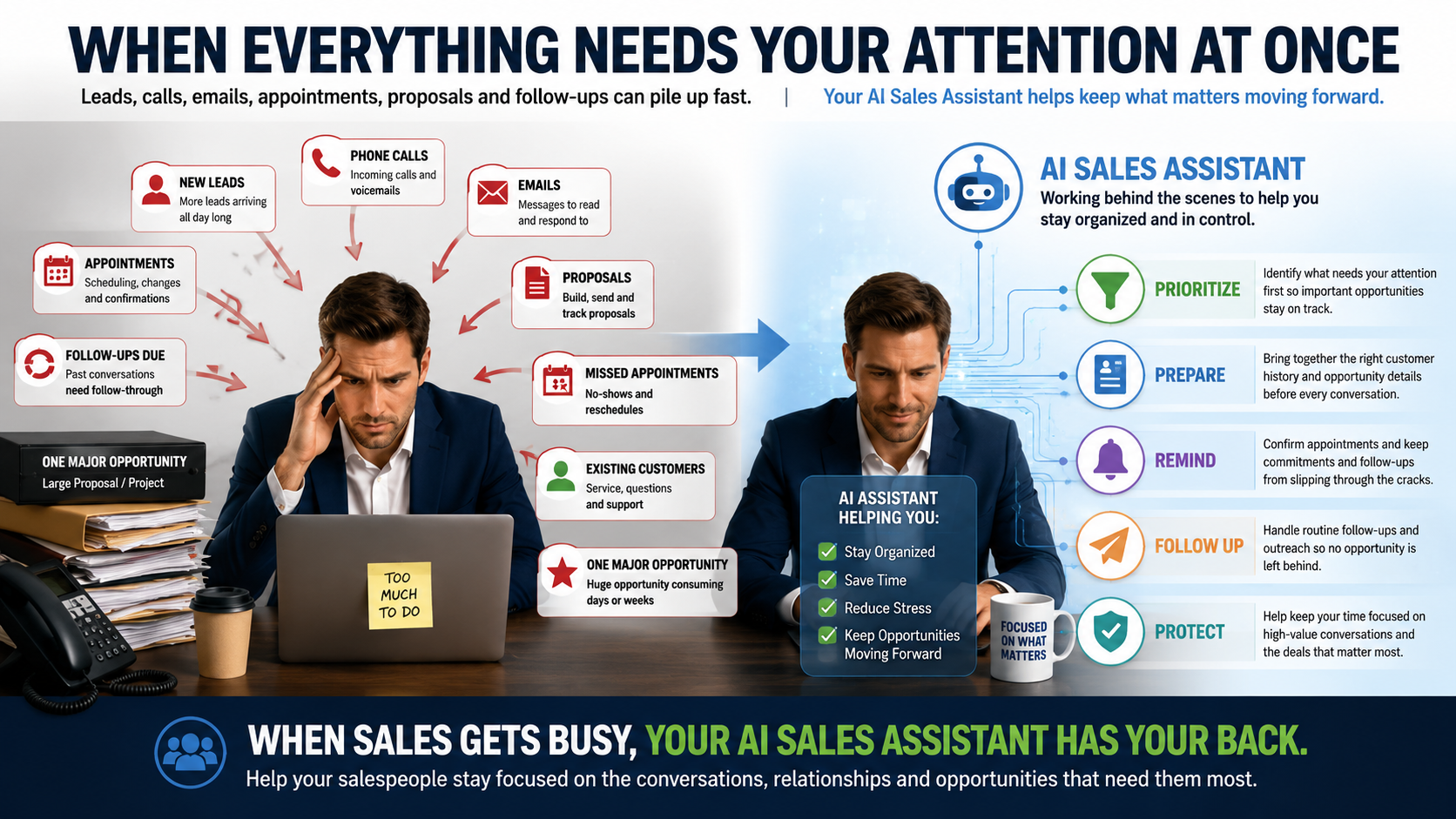
Some days everything goes according to plan. Other days new opportunities arrive, phones ring, appointments need attention, proposals consume hours, follow-up piles up, and yesterday's work is still waiting. Then the really big opportunity shows up.
Meet Your AI Sales Assistant.
Help organize information, prepare for conversations, keep commitments visible, support appropriate follow-up, and reduce some of the repetitive work surrounding the salesperson, so more of their attention can stay on customers, relationships, and opportunities.
When Sales Gets Busy, Your AI Sales Assistant Has Your Back.
Even a very good salesperson can become overwhelmed when legitimate demands pile up faster than one person can handle them. New leads still arrive while the salesperson is preparing a major proposal. Existing prospects still need follow-up. Appointments still need confirmation. Customers still email. Opportunities still age. AI and automation can help support the work surrounding the salesperson without requiring the salesperson to personally remember and perform every routine step.
Time and Attention
Help Your Salespeople Spend More Time Selling.
Selling is only part of a salesperson's day. The machinery around selling can consume enormous amounts of attention.
Work Around Selling
- Remembering who needs follow-up
- Searching notes and communication history
- Updating opportunities and CRM records
- Checking appointments and commitments
- Watching for neglected opportunities
- Sending repetitive reminders and outreach
Where Human Time Can Matter Most
- Talking with prospects
- Listening and understanding needs
- Building trust and relationships
- Demonstrating solutions
- Thinking creatively
- Negotiating and making important decisions
Step 1: Better Tools
First, Give Your Salespeople Better Tools.
AI becomes much more useful when it works alongside organized customer and sales information.
Contacts & Companies
Keep useful relationship information together, including multiple people connected with an organization where configured.
Opportunities & Pipelines
Track opportunities, stages, ownership, value, status, and the movement of sales activity through the process.
Tasks & Appointments
Keep commitments, scheduled conversations, and salesperson responsibilities visible instead of relying on memory alone.
Communications & Notes
Preserve useful authorized history so the next conversation can begin with more context.
Proposals & Contracts
Prepare, send, track, and manage documents with workflows, electronic signatures, and payment capabilities where appropriate.
Dashboards & Reporting
Give salespeople and management better visibility into opportunities, pipeline activity, results, and areas deserving attention.
Now Give Them an AI Assistant to Help Use Them.
Depending on configuration, AI can help summarize information, answer questions about supported CRM data, prepare briefs, assist with qualification, identify follow-up needs, support workflow decisions, and reduce repetitive sales administration.
Step 2: Prepare
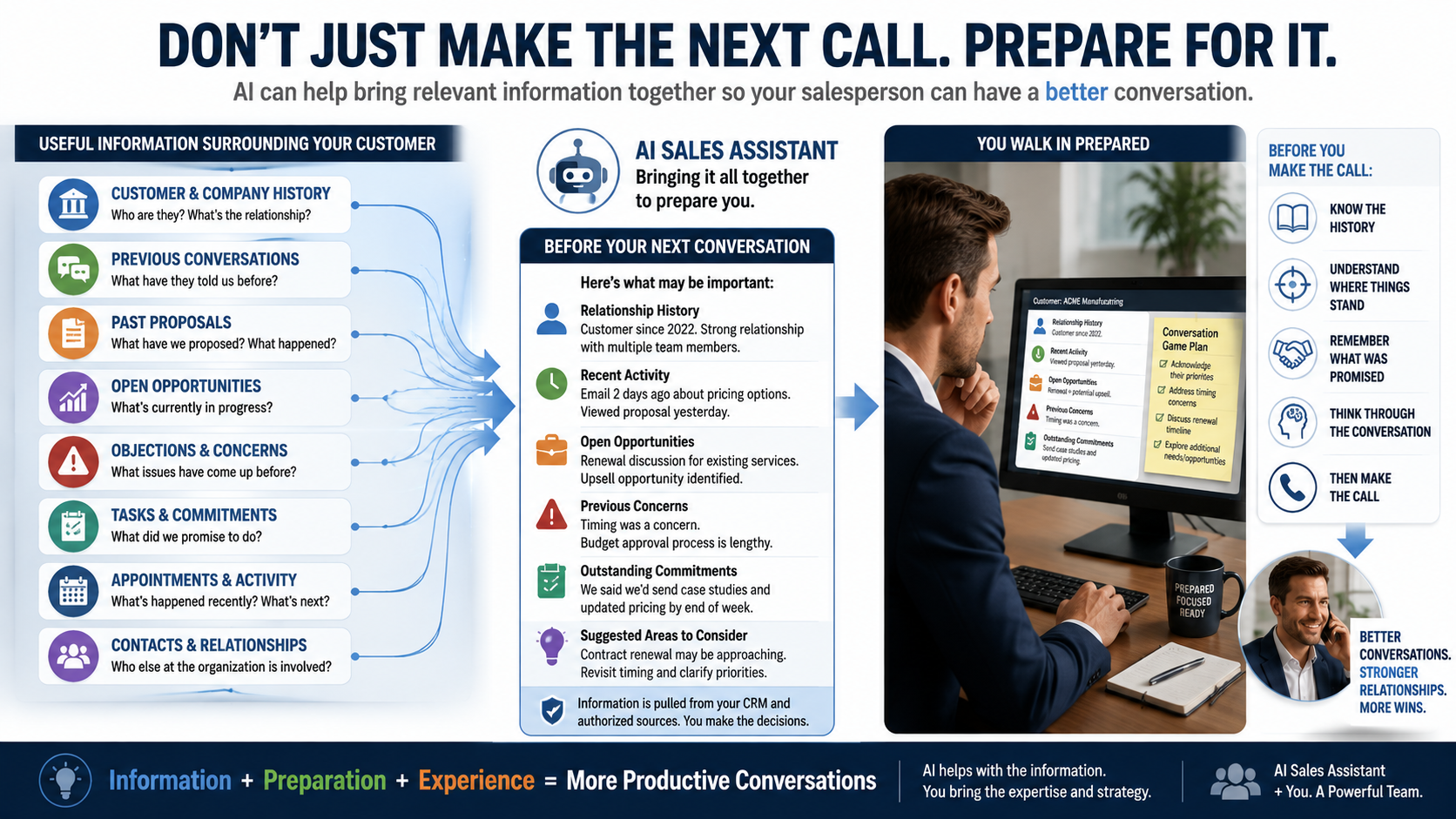
Don't Just Make the Next Call. Prepare for It.
Before the salesperson picks up the phone, walks into the meeting, or follows up, help them remember who they're talking to and what matters. Relevant authorized CRM information may include previous communications, open opportunities, appointments, tasks, prior proposals, notes, recent activity, and other available context. AI can help bring that information together so the salesperson spends less time reconstructing the relationship before the conversation begins.
Your salesperson doesn't have to remember everything for your business to remember it. Good CRM information can become institutional sales memory.
Useful History
Past Context Still Matters
A Consistent Picture
Step 3: Prioritize
Start the Day With a Better Picture of What Needs Your Attention.
When everything feels important, salespeople need help seeing what deserves attention.
Today's Commitments
Appointments, tasks, and promised follow-up can be easier to see before the day gets away from the salesperson.
Opportunities Needing Attention
Configured rules, stale-opportunity detection, and sales information can help surface items that may be slipping.
Prioritize With Business Criteria
Advanced AI and workflows can help organize or score opportunities using criteria the business establishes. AI prioritization is decision support, not a prediction of who will buy.
Depending on configuration, recurring or scheduled AI processes can also help create salesperson briefings and other proactive assistance rather than requiring the salesperson to remember to ask every time.
Step 4: Protect Time
Protect Your Salesperson's Time.
Your salesperson doesn't necessarily need to personally chase every appointment just to keep the calendar productive.
Reduce Surprises
Reschedule Without Stopping
Reconnect and Offer Another Time
Sometimes a prospect is careless. Sometimes something legitimate happened. Sometimes they're embarrassed that they missed the appointment and never reach back out. Depending on the business's strategy, consent requirements, and configuration, the system can help continue appropriate follow-up days, weeks, or even later in the sales cycle without requiring the salesperson to personally chase every missed meeting.
Step 5: Manage the Pipeline
What Happens When One Opportunity Needs Almost Everything You've Got?
A major assessment or proposal can consume days or weeks of a salesperson's attention. The rest of the pipeline doesn't stop while they're working on it.
The salesperson may be doing exactly the right thing by concentrating on the large opportunity. The supporting system can help keep other tasks, commitments, follow-up, and aging opportunities visible while the salesperson focuses on the work that genuinely needs their expertise.
Keep Other Opportunities Visible
Stale-opportunity detection, tasks, reminders, and configured workflows can help reduce the chance that everything else disappears.
Share the Work When Appropriate
Assignments, followers, permissions, and collaboration can allow authorized team members to participate in important accounts without losing ownership clarity.
Let AI Handle Selected Repetition
Routine information gathering, summaries, reminders, and approved follow-up may be candidates for assistance while the salesperson concentrates elsewhere.
Step 6: Proposals
Don't Let the Proposal Disappear Into an Inbox.
Sending the proposal doesn't necessarily have to be the end of the process.
Assemble Proposal Information
Viewed, Signed, Completed
A Natural, Later Check-In
Rely Only on What the System Provides
Sales Opportunity Journey
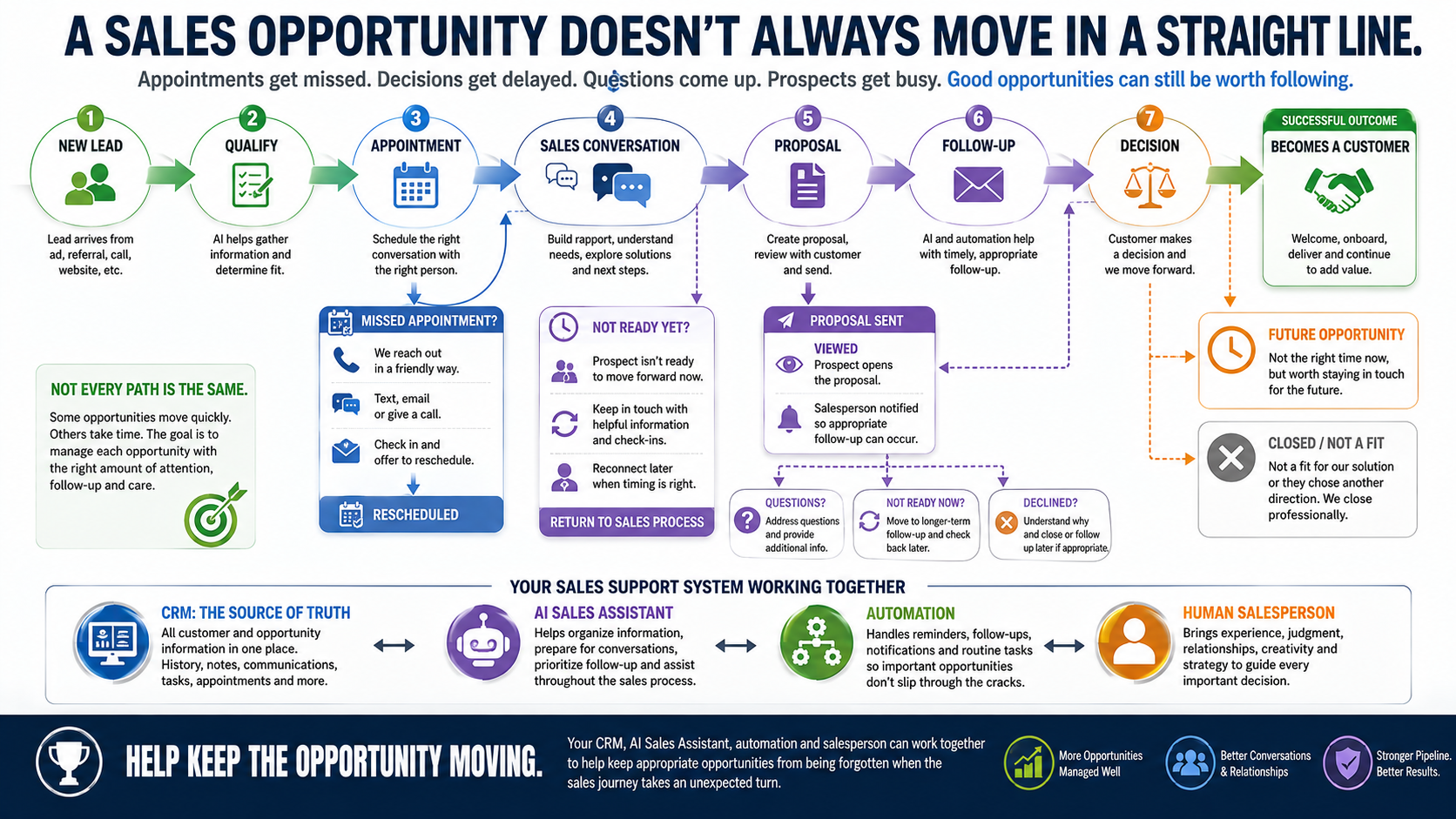
A Sales Opportunity Doesn't Always Move in a Straight Line.
Appointments get missed. Decisions get delayed. Questions come up. Prospects get busy. Some opportunities are worth revisiting later. Others should be closed professionally.
Step 7: Good Habits
Make Good Sales Habits Easier to Maintain.
Some salespeople love maintaining the CRM. Others would rather spend every minute talking with customers. And even disciplined people can fall behind when things get busy.
The objective isn't to criticize the salesperson. It's to make useful sales discipline easier through reminders, summaries, tasks, workflow assistance, natural-language CRM interaction, and carefully selected automation.
Ask Instead of Hunt
Supported AI tools can let users ask natural-language questions about CRM information instead of manually searching through every screen.
Summarize Instead of Reconstruct
Authorized contact and communication information can be condensed into useful context before follow-up.
Turn Activity Into Next Steps
Depending on configuration, call summaries, workflow actions, and AI can help identify commitments, create tasks, or prepare follow-up information.
Personal, Not a Clone
Your AI Sales Assistant Can Be Personal Without Pretending to Be a Digital Clone.
Different salespeople may have different assignments, customers, responsibilities, and ways of working. A smaller sales organization may configure assistance around individual salespeople, such as John's assigned opportunities and Susan's assigned opportunities, using appropriate permissions, workflows, CRM assignments, and authorized information.
Help John Prepare
A Different Experience
AI should not be represented as automatically observing a salesperson and learning or duplicating their complete personality, judgment, style, or thought process.
Your Process
Your Sales Process Isn't Exactly Like Everybody Else's.
There isn't one magic AI sales template that's right for every business. Some organizations have tightly standardized sales processes. Others give experienced salespeople considerable freedom. Some need basic CRM organization first. Others already have mature processes and want deeper automation. GSW can assess the current environment, problems, goals, people, CRM maturity, and desired future state before recommending an implementation approach.
The more responsibility an organization gives AI, the more important thoughtful configuration, testing, permissions, monitoring, and appropriate oversight can become.
You Decide How Much Responsibility AI Receives.
Your sales philosophy is your decision. GSW's job is to help you understand the possibilities and design the technology around appropriate boundaries.
AI Handles More
Additional Human Involvement
Human Review and Judgment
For Management
What About the Owner or Sales Manager?
Sales intelligence can help management ask better questions about the pipeline, the process, and where attention may be needed.
Pipeline Health
Which opportunities are moving? Which appear stalled or neglected? Where may management attention be useful?
Patterns & Objections
Recurring objections, lost reasons, customer concerns, and sales-cycle patterns may reveal more than an isolated deal.
Coaching & Process Questions
Use information to investigate context and identify opportunities for improvement rather than automatically declaring an employee successful or unsuccessful.
Sometimes a salesperson needs coaching. Sometimes lead quality is poor. Sometimes pricing, proposals, positioning, website expectations, or the sales process itself is creating the problem. AI Sales Manager or Owner assistance can potentially help surface signals. Management still needs context and judgment.
Beyond the Basics
And This Is Only the Beginning.
Advanced sales AI can go well beyond a single chatbot or workflow. Depending on the objective, more sophisticated implementations may involve custom workflows, AI agents, Agent Studio, integrations, call recording and transcription, proposal automation, specialized dashboards, external services, APIs, permissions, and custom business knowledge.
Advanced implementations may require assessment, a defined scope of work, professional implementation, testing, and applicable technology or usage charges.
Some Capabilities May Involve Additional Usage or Services.
Depending on configuration and use, advanced AI, AI agents, premium automation, telephone calls, SMS, email delivery, recording, transcription, payment processing, external integrations, APIs, third-party services, and professional implementation may involve additional technology, usage, transaction, or service charges. Specific architecture, included allowances, and applicable charges should be confirmed for the selected AI Assistant Team plan and implementation before launch.
Behind every good AI solution is a human.
Consequential sales decisions, pricing, contracts, negotiation, and customer commitments require human review and control. The assistant supports the human salesperson, it does not replace the relationship.
The GSW Implementation Progression
1. Organize & Train
Approved knowledge and boundaries
2. Assist & Coach
Side-by-side staff support
3. Copilot
Drafts with human approval
4. Carefully Automate
Routine work with escalations
AI Assistant Team Pricing
You are not buying each assistant separately.
The AI Assistant Team is a flexible architecture. Choose a team plan based on your usage level, then configure the assistants that fit your business.
A simple starting point for lighter activity. Access to the AI Assistant Team with applicable AI usage paid as you go.
- Full access to AI Assistant Team roles
- Pay-as-you-go AI usage
- Ideal for lighter expected activity
For businesses expecting more regular AI activity. Includes defined monthly AI usage allowances, with applicable additional usage thereafter.
- Full access to AI Assistant Team roles
- Defined monthly AI usage allowances
- Predictable monthly baseline
For businesses expecting substantially heavier AI usage. Provides the largest included usage structure and broader applicable fair-use allowances.
- Full access to AI Assistant Team roles
- Largest included usage structure
- Designed for higher-volume organizations
Not Sure Where to Start?
A small business with lighter expected usage may begin with Flex. Businesses expecting more regular activity may prefer Plus. Higher-volume organizations may find Premier more appropriate. If your usage changes, we can help you evaluate whether another plan makes better economic sense.
Telephone service, calling, messaging, AI usage, and other variable or enhanced capabilities may involve additional charges depending on the selected solution and usage.
Common Questions
Frequently Asked Questions
How does the AI Sales Assistant work with and support the salesperson?
The role described here is an assistant to the salesperson. It is designed to help with information, preparation, organization, follow-up, and selected repeatable responsibilities so the salesperson can devote more attention to selling and relationships. How much responsibility AI receives is determined by the organization and implementation.
Can it tell a salesperson which leads deserve attention?
AI and workflows can help organize, qualify, score, or prioritize opportunities using available information and criteria established by the business. That should be treated as decision support, not a guarantee that AI knows which prospect will buy.
Can it help prepare a salesperson before a call?
Yes. Depending on available authorized CRM information and configuration, AI can help summarize relevant contact, company, communication, opportunity, appointment, task, and other information so the salesperson can prepare more efficiently.
Can it confirm and reschedule sales appointments?
Appointment reminders, confirmations, booking, and rescheduling can be configured in supported implementations. Some of these responsibilities overlap with the AI Appointment Assistant. The customer experience matters more than forcing every task into a rigid assistant title.
Can it follow up after a missed appointment?
Potentially. Appropriate email, text, phone, or workflow follow-up can be configured to help reconnect, offer rescheduling, or continue longer-term outreach, subject to consent, compliance, business rules, and channel capabilities.
Can it prepare and send proposals?
Proposal and document workflows, templates, electronic signatures, and related automation can be supported. AI can potentially assist with information and drafting. For customized, negotiated, or consequential proposals, human review may be appropriate before sending or making commitments.
Can we know when a proposal was viewed?
Supported document lifecycle activity can include viewed, signed, and completed events that may be used for notifications and workflows. This should not be confused with detailed page-by-page reading analytics unless a configured system specifically provides those capabilities.
Can each salesperson have different AI assistance?
Potentially. CRM assignments, permissions, workflows, and authorized information can support salesperson-specific configurations. This does not mean AI automatically learns and duplicates a salesperson's complete personality or judgment.
Do we have to start with the most advanced automation?
No. A business can start with CRM organization and assistance, then add deeper AI and automation as appropriate. Or it may choose a more aggressive starting point. The recommended roadmap is guidance, not a mandatory sequence.
Can management use AI to evaluate the sales team?
AI and reporting can help surface pipeline conditions, activity, patterns, objections, and areas deserving investigation. Those signals should help management ask better questions and consider context rather than automatically making employee judgments.
Related Assistants
Often used together.
Combine when it makes sense. Specialize when it helps. You do not need to choose everything on day one.
AI Sales Support Team
Three Coordinated Responsibilities Working Around Your Salespeople.
Explore Sales Support TeamAI Website Assistant
Looking for Something? Just Ask.
Explore Website AssistantAI Appointment Assistant
Getting the Appointment Is Only Half the Job. Now Help Make Sure It Actually Happens.
Explore Appointment AssistantWhat Could Your Salespeople Accomplish With a Better Assistant Behind Them?
Let's explore where AI, CRM, and automation could help protect their time, improve preparation, and keep appropriate opportunities moving.
Get Started Websites: We listen before we recommend.