
More Than a Business Phone System
Bring professional calling, mobility, video meetings, screen sharing, conferencing, call queues, electronic faxing and more together in a communications system built around the way your team works.
Designed for small teams, growing organizations and multiple locations, with employees working in the office, remotely or on the go.
GSW Business Phone System
Professional calling, mobility, video, conferencing, queues and electronic faxing in one cloud system.
A Phone System That Helps Your Business Do More
Your phone system should make communication easier, not become another system your team has to fight. GSW Business Phone System brings conventional business calling together with modern cloud communication and collaboration tools.
Serve Customers Better
Route calls professionally, connect callers with the right people and give busy service teams tools for handling higher call volumes.
Work From More Places
Keep employees connected through desk phones, computers and mobile devices whether they work in the office, at home or on the go.
Grow More Easily
Add people, locations and communication capabilities as your needs change instead of designing around a rigid traditional phone system.
Bring Tools Together
Voice, video, chat, conferencing, screen sharing and other communications capabilities can work within a broader unified communications environment.
Reduce Phone-System Burden
Cloud communications can reduce the need to maintain the kind of complex on-site phone-system infrastructure traditionally kept in the office.
Build Around Your Business
Routing, devices, users and features can be selected around how your organization actually communicates instead of forcing everyone into one setup.
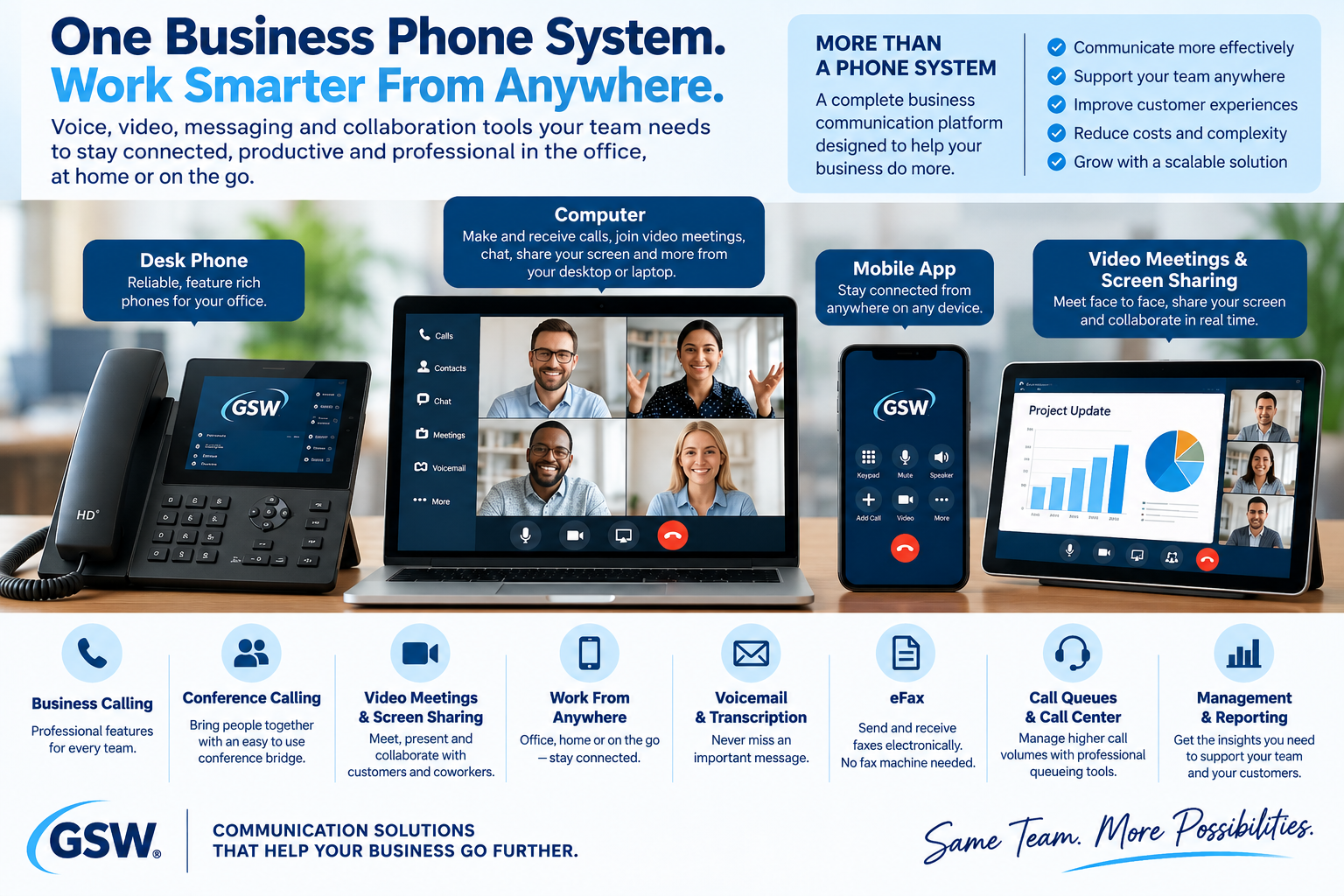
Meet, Present & Collaborate
Video Meetings and Screen Sharing Are Part of the Story
This is not limited to picking up a telephone. The unified communications environment can support video meetings, chat and screen sharing so employees can meet and collaborate from their computers and mobile devices.
Could this reduce another software subscription?
For some businesses, built-in communication and collaboration tools may reduce the need for separate tools. We will help you compare what you already use with the capabilities available in your proposed system before you replace anything.
Conference Calling
Bring Multiple People Onto the Same Call
Conference bridge capabilities give teams another way to bring multiple participants together for a business conversation. This complements video meetings and screen sharing when a traditional conference-call experience is the better fit.
Exact meeting, conferencing, participant and dial-in capabilities that are important to your purchase will be confirmed during solution planning.
Electronic Faxing
Fax Without Building Your Office Around a Fax Machine
Some industries and customers still rely on faxing. Electronic fax capabilities can provide a more convenient way to send and receive business faxes without making a traditional physical fax machine the center of the process.
- Electronic faxing and fax-to-email capabilities
- Less dependence on paper, toner and a dedicated physical fax machine
- Receive business documents in a format that is easier to distribute and manage
Need faxing?
We will determine the appropriate fax number, service configuration and any related requirements as part of your proposal. You do not need to know the telecom details before talking with us.
- Desk phone for the traditional office experience
- Computer-based calling and unified communications
- Mobile access for employees away from the office
- Presence, contacts and collaboration tools for distributed teams
Mobility
Your Business Number Can Go Beyond Your Desk
Employees do not have to be sitting beside a traditional office telephone to stay connected. Depending on the configuration, they can make and receive business communications from a desk phone, computer or mobile device.
Capability Reference
Explore the Business Phone Capabilities
This deeper page is for customers who want to know what is possible. The final configuration depends on your needs and the current service options available when your system is designed.
Calling & Routing
Help callers reach the right destination while giving your team familiar business-phone controls.
- Auto attendants and multi-level call routing
- Dial-by-name directory
- Business-hours, after-hours and holiday routing
- Call forwarding and simultaneous ring
- Attended and unattended call transfer
- Internal extension dialing and speed dial
- Caller ID controls and dynamic caller ID options
- Call hold and music or messaging on hold
Queues & Customer Service
Support teams that receive more calls than one person can answer at once.
- Call queues and contact-center capabilities
- Department and skill-based routing
- Callback options that can let callers keep their place without remaining on hold
- Multiple agents and departments
- Queue monitoring and call activity reporting
- Supervisor-style tools such as listen, whisper and barge where supported
- Call recording options
Unified Communications
Move beyond voice-only calling when your team needs richer ways to communicate.
- Desktop and mobile communications
- Video meetings and screen sharing
- Conference bridge capabilities
- Individual and group chat
- Contacts and user presence
- Click-to-call and softphone calling
- Productivity tools such as tasks and notes where available
Messages, Voicemail & Fax
Give people more ways to communicate and manage messages.
- Voicemail
- Voicemail-to-email
- Voicemail transcription capabilities
- Electronic fax and fax-to-email
- Text-enabled business numbers and SMS capabilities where configured
Management & Visibility
See more of what is happening across your business communications.
- Administrative portal
- Call history
- Detailed call activity reporting
- Contact-center reporting and analytics capabilities
- Remote configuration and service management
- Tools for managing users, locations and communication features
Business Continuity & Scale
Cloud communications can make it easier to adapt when your organization or working environment changes.
- Cloud-based communications architecture
- Support for small and larger organizations
- Multiple locations and distributed workforces
- Ability to add service as staffing needs change
- Telecom-focused redundancy and failover capabilities
- Options designed to help communications continue through certain local disruptions
Some advanced features listed above may vary by current service package, equipment and configuration. Any capability material to your decision will be confirmed before purchase.
Busy Periods
When the Phones Get Busy, Your System Should Help
For customer service, sales, scheduling and other call-heavy teams, the phone system can do much more than simply ring every phone.
Never Miss an Important Business Call
Give Callers More Paths to the Right Help
Incoming calls can be routed by department, business hours, employee availability and other configured rules. When a team is busy, queue and callback capabilities can help create a more professional experience instead of simply letting calls disappear into voicemail.
Want 24/7 AI answering too?
GSW Hub Integrated Communications can add AI-powered answering, information assistance, appointment scheduling and other AI capabilities through an eligible AI Assistant Team plan. It is a separate integrated communications service with applicable usage, and GSW can help determine whether combining the two systems makes sense.
Explore GSW Hub Integrated Communications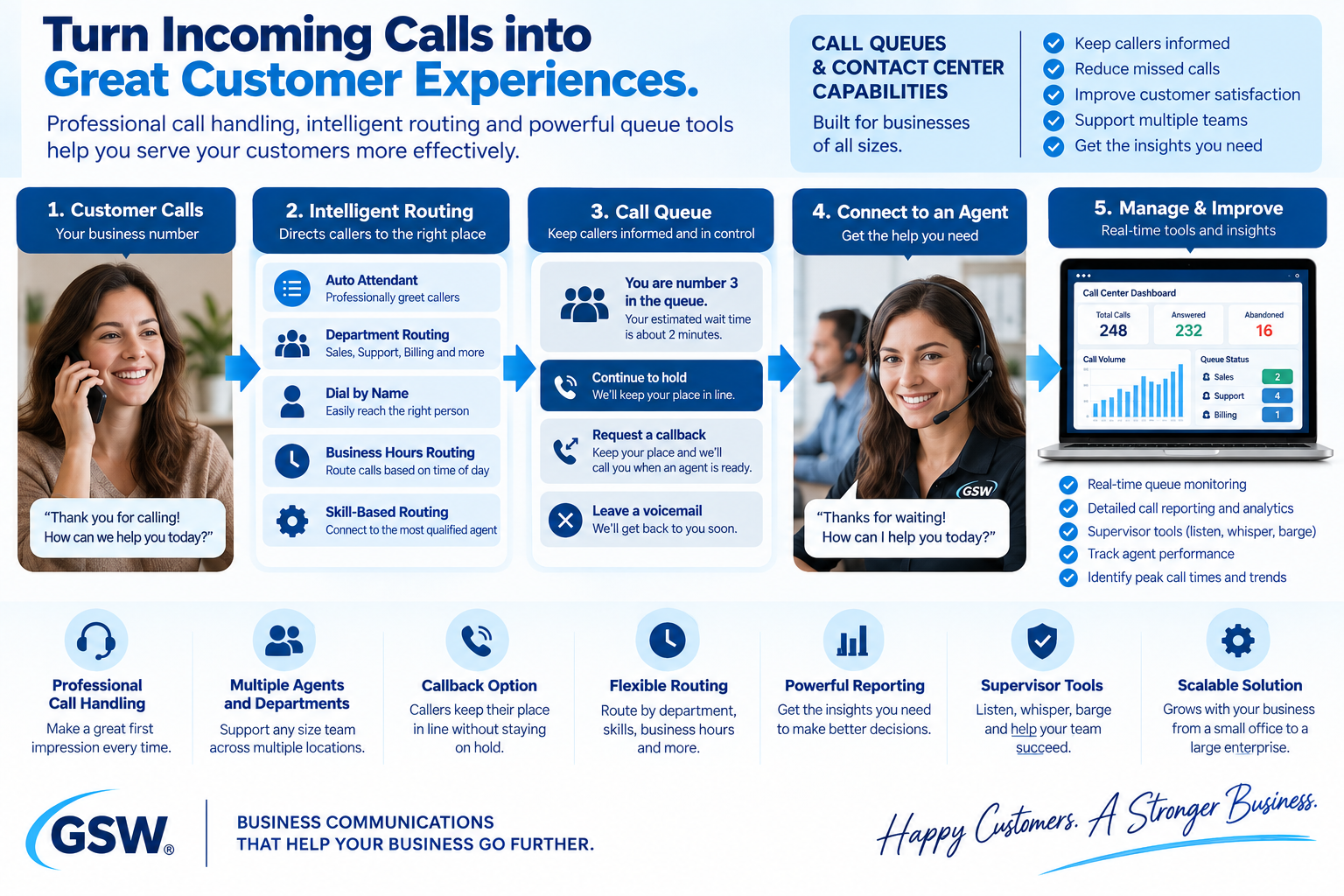
For Managers & Supervisors
See More Than Whether the Phone Rang
Call history, reporting and contact-center tools can help managers understand call activity, identify busy periods and support teams handling customer conversations. More advanced supervisor capabilities may also support coaching and real-time assistance.
Specific analytics, supervisor tools and package entitlements will be confirmed when they are important to the proposed solution.
Fit Check
Is the GSW Business Phone System Right for You?
You do not have to decide based on telecom terminology. Start with how your people work and what you need the communications system to accomplish.
This May Be a Strong Fit If You...
- Have employees who spend substantial time making or receiving calls
- Want a conventional professional business-phone experience
- Need call queues, departments or more advanced human call handling
- Want desk phones while also supporting computer and mobile users
- Need video meetings, screen sharing, conferencing or electronic faxing
- Have multiple locations or remote employees
- Want a system that can scale as staffing and locations change
Need More CRM, Automation or AI?
If you want calls and messages tied directly into your CRM, workflows, automated follow-up and AI Assistant Team, GSW Hub Integrated Communications may be the better fit for some or all of your lines.
Explore Integrated CommunicationsYou can also use both.
A hybrid design can place human-heavy calling on the Business Phone System while using GSW Hub Integrated Communications where CRM integration, automation or AI creates greater value.
Hybrid configurations use two separate communications platforms and may involve separate logins, administration, routing and billing considerations.
Start the Conversation
You Don't Have to Figure Out the Phone System First
Tell us how your business communicates. We can ask the questions, identify the requirements and help determine whether you need the GSW Business Phone System, GSW Hub Integrated Communications, or a combination of both.
Keep Exploring
Want to Go Deeper?
You are exploring the GSW Business Phone System. You can also see how our integrated communications option connects phone service with AI, CRM and automation, or compare both approaches side by side.
GSW Hub Integrated Communications
Explore phone service connected with AI, CRM, automation, appointments and follow-up.
Explore Integrated Communications Side by SideCompare Both Systems
See the different strengths of each system and where using both may make sense.
View Detailed ComparisonLet's Build the Right Communications Mix
You may need one system, the other, or a carefully designed combination. Our job is to help you understand the options and build around the way your business actually works.
Service Notice
Features, equipment, availability, calling terms, service configuration and applicable charges vary by solution and customer requirements. Some capabilities described on this exploratory page may depend on the current provider package, equipment, configuration or optional services. Capabilities material to your purchase will be confirmed in your proposal and implementation scope. Access to a feature does not by itself include custom configuration, integration, implementation or ongoing management unless expressly included.